
Settings
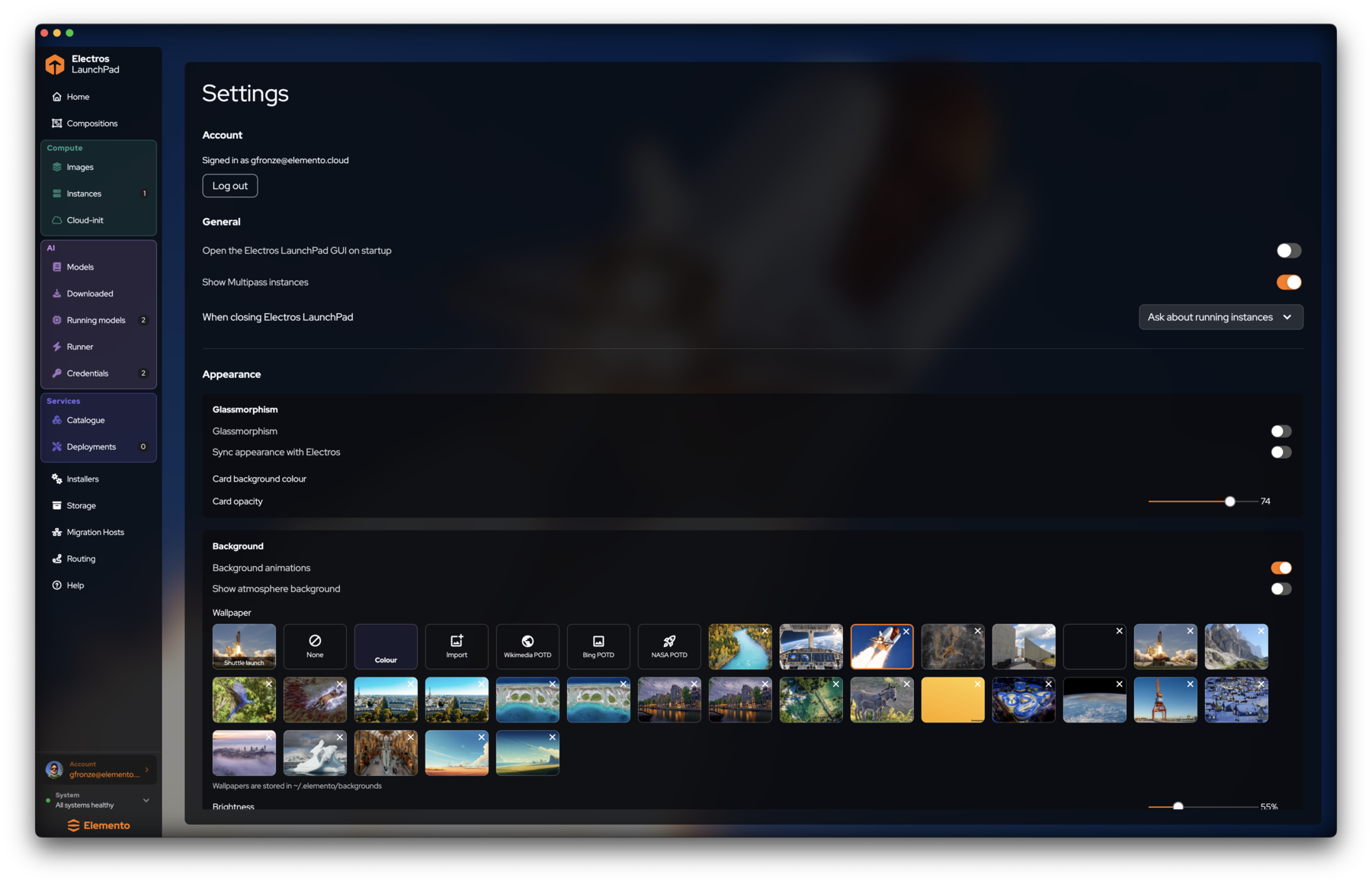
Open Settings from the Account row in the sidebar footer (chevron). The page covers account session, general behaviour, and appearance.
Account
- Shows the signed-in identity (for example
you@elemento.cloud). - Log out ends the session.
General
| Setting | What it does |
|---|---|
| Open the Electros LaunchPad GUI on startup | Launch the UI when you log into the Mac |
| Show Multipass instances | When on, stock Multipass VMs can appear alongside LaunchPad instances — useful if you run both |
| When closing Electros LaunchPad | e.g. Ask about running instances so you do not quit with workloads still hot |
Appearance
Glassmorphism
- Glassmorphism — translucent cards
- Sync appearance with Electros — match the Electros desktop client when both are installed
- Card background colour / Card opacity — fine-tune the glass look
Background
- Background animations
- Show atmosphere background
- Wallpaper grid: presets, None, Colour, Import, plus Wikimedia / Bing / NASA POTD
- Wallpapers are stored under
~/.elemento/backgrounds - Brightness slider for the backdrop
Appearance never changes VM or model behaviour — only how the control plane looks while you work.
Next
- Getting started — shell orientation
- Tutorial — first-hour path